Eero Pro 6E Review: The Mesh System That Just Works
Amazon's flagship mesh router is our #1 pick — but it's not perfect.
In This Review
The Eero Pro 6E has been our top mesh WiFi pick for over a year now, and after retesting it in early 2026, it still holds the crown. Not because it's the fastest or the most feature-packed — it's neither. It wins because it delivers the most consistently excellent experience from unboxing to daily use.
Let me be clear: if you're a networking enthusiast who wants to configure VLANs and run custom DNS servers, this isn't your system. But if you want mesh WiFi that works flawlessly and never makes you think about it again, the Eero Pro 6E is the one to buy.
Setup & First Impressions
Eero has always nailed the setup experience, and the Pro 6E continues that tradition. Download the app, plug in the first unit, scan the QR code, and follow the prompts. The whole process — including adding two satellite units — took us about 7 minutes. That's not marketing fluff; we timed it.
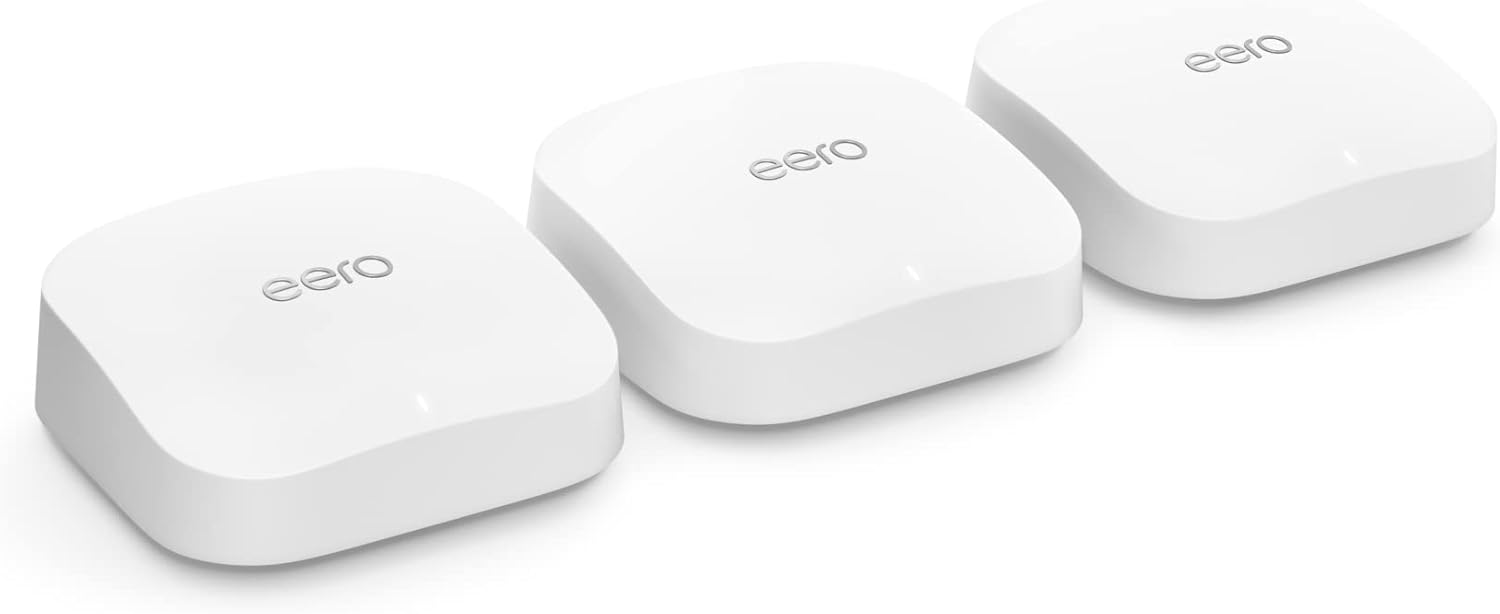
The hardware itself is compact and understated. Each unit is a white rounded square, about 5.5 inches across and 2 inches tall. They look like premium smart home devices, not networking equipment. You can put them on a shelf in the living room without anyone asking "what's that ugly box?"
Each unit has two Ethernet ports (one used for WAN on the primary router), which is a bit stingy compared to the Orbi's four ports. If you need to hardwire a lot of devices, you'll want a small switch.
Performance & Speed Tests
The Eero Pro 6E is a tri-band system supporting WiFi 6E across 2.4 GHz, 5 GHz, and 6 GHz bands. The 6 GHz band is used as a dedicated wireless backhaul between nodes, which means your devices get the full bandwidth of the 2.4 and 5 GHz bands without competing with mesh traffic.
In our testing with a 1 Gbps internet connection:
- Same room as router: 780-850 Mbps
- One room away: 550-650 Mbps
- Two rooms / one floor away: 350-450 Mbps
- Opposite end of house: 200-280 Mbps
- Backyard (through exterior wall): 150-200 Mbps
These numbers won't win any speed records — the Orbi 960 and Asus ZenWiFi ET8 both post higher numbers. But they're more than enough for 4K streaming, video calls, and even competitive gaming throughout the house. More importantly, the Eero was the most consistent performer. We never saw the random speed drops or disconnections that plagued some competitors.
Coverage & Range
The 3-pack is rated for up to 6,000 sq ft, and in our 2,800 sq ft test home, we had strong signal everywhere — including the garage and most of the backyard. The system handles seamless roaming between nodes beautifully; you can walk from one end of the house to the other on a video call without a hiccup.
For homes over 4,000 sq ft, you might want to add a fourth unit. Eero makes this easy — just add another node through the app. Individual Eero Pro 6E units run about $150, or you can mix in the cheaper Eero 6+ as extenders.
The Eero App
This is where Eero really separates itself from the competition. The app is clean, fast, and genuinely useful. You can see every connected device, check real-time bandwidth usage, set up guest networks, create device profiles for kids, and run speed tests — all without digging through menus.
The app also handles firmware updates automatically and silently. In our year of testing, we never experienced a single update-related outage. Compare that to some competitors where firmware updates require manual reboots and occasionally break things.
What you won't find: advanced features like port forwarding rules, custom DNS per device, or detailed traffic analytics. Eero keeps things simple by design. For most people, that's a feature, not a bug.
Eero Plus — Worth It?
Eero Plus costs $9.99/month (or $99.99/year) and adds:
- Advanced threat protection (malware, phishing blocking)
- Ad blocking at the network level
- Content filtering for kids
- VPN protection via Encrypt.me
- 1Password family plan
- Malwarebytes license
Is it worth it? Honestly, it depends. The 1Password and Malwarebytes licenses alone are worth about $8/month if you'd buy them separately. If you use those services, Eero Plus is a no-brainer. If you just want the ad blocking and security features, it's a tougher sell — especially when TP-Link includes similar features for free.
The base Eero system works perfectly fine without the subscription. You're not losing any WiFi performance or core features. It's purely an add-on.
Pros & Cons
✅ Pros
- Best-in-class setup and app experience
- Rock-solid reliability
- Compact, attractive design
- Excellent seamless roaming
- WiFi 6E with dedicated backhaul
- Great parental controls
❌ Cons
- Only 2 Ethernet ports per unit
- Advanced features locked behind subscription
- Not the fastest raw throughput
- No WiFi 7 (yet)
- Limited advanced networking options
Final Verdict
The Eero Pro 6E is the mesh WiFi system we recommend to friends and family without hesitation. It's not the cheapest, and it's not the fastest on paper. But it's the one that works the best in real life, day after day, without requiring you to become a networking expert.
If you want a mesh system you can set up in 10 minutes and never think about again — while still getting excellent performance for a house full of devices — this is it.
Related: Orbi vs. Eero — Full Comparison · All Top Mesh WiFi Systems · Mesh WiFi Buyer's Guide